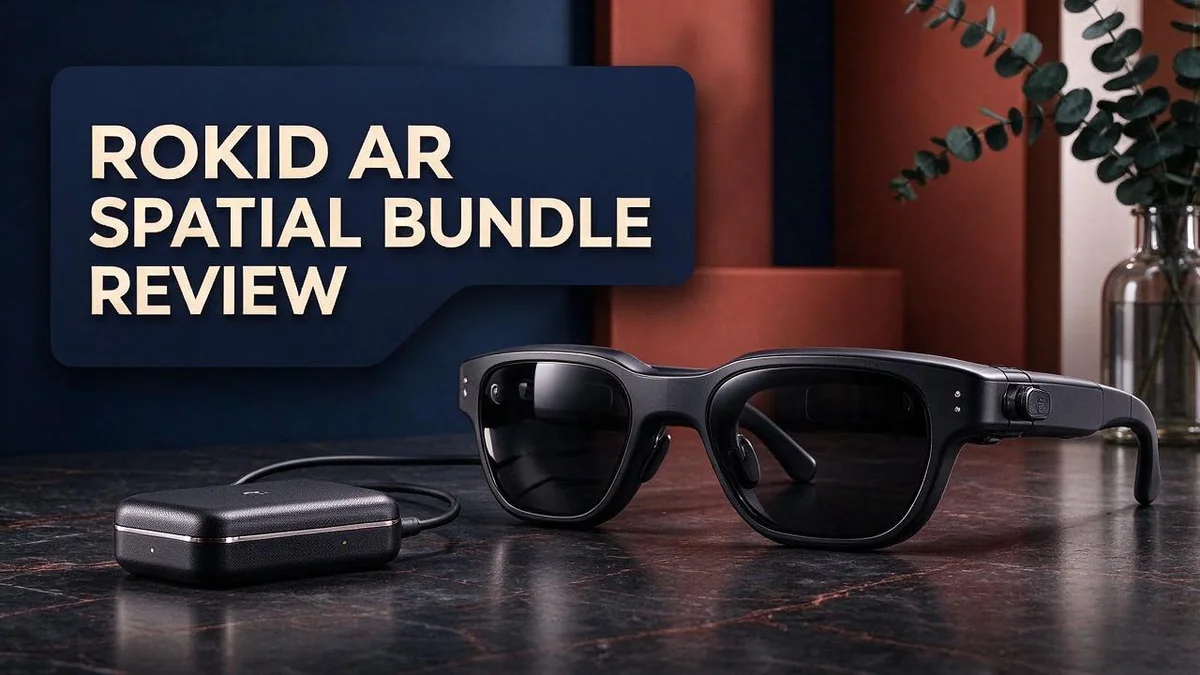
Rokid AR Spatial Bundle Review: Max 2 Glasses and Station 2 Tested
Imagine a 300 inch screen that fits in your bag. The Rokid AR Spatial Bundle aims to make that idea real.
The bundle pairs the Rokid Max 2 AR glasses with the Station 2. Together, they create a private, immersive display wherever you go.
You can open spatial screens and run several apps at once. You can also build a multi screen workspace or relax with movies and games on a huge virtual view.
The Max 2 includes myopia adjustment, so it helps users who need vision support. The Rokid app handles device setup, media management, and AI service activation.
This review looks at how the bundle works and who may enjoy it. We also compare it with the Apple Vision Pro. Let’s dive in.
In a Nutshell
-
Workspace power: The bundle works as a multi screen workspace, so you can keep documents, video, and chat side by side without switching windows.
-
Entertainment ready: Movies, shows, and games feel immersive because the picture fills your view instead of sitting on a small panel.
-
Simple setup: The Rokid official app guides device setup, manages your media, and activates AI services in one place.
-
Travel friendly: Rokid markets these as portable smart display glasses. One third party video also describes Station 2 as a portable triple screen setup.
-
Main rival: A YouTube video points to the Apple Vision Pro as the alternative, so many shoppers will compare the two before they decide.
-
Good to know: Our research found no confirmed details on battery life or weight, so check those specs before you buy.
Overall, this bundle suits people who want a big, flexible screen without carrying a bulky monitor.
What’s in the Bundle: Max 2 Glasses and Station 2
Think of the Rokid AR Spatial bundle as a team of two parts. You get Max 2 AR glasses and Station 2 in one box. Each part plays a clear role.
The Max 2 glasses sit on your face. They show the screen right in front of your eyes, so the picture stays with you wherever you look. Wearing them feels like carrying a screen with you.
Station 2 works as the portable triple screen setup. It helps build a larger workspace around you. This split lets the glasses handle the view while the station handles the layout.
Why the split matters: Glasses give you the big picture. The station gives you space to arrange it. Together, they create a flexible setup for work and play.
Who benefits most? Students, travelers, and remote workers may like this kind of setup. They often juggle many files and small desk space. Two parts can help them stay organized.
What to check first: Confirm both items arrive in the box before you start. Look for the Max 2 glasses and the Station 2 unit. Keep the packing list nearby as you unbox. Our research did not list cable or accessory details, so read the official store listing closely.
Planning your space: Clear a flat table so the station sits steady. Keep a clear wall or open area in view for your screens. Knowing the contents helps you plan this step with ease.
In short, the bundle gives you glasses and a station that work together. Knowing each role makes the rest of the review easier to follow. Let us look at each part in more detail.

- 3-Screen Multitasking: Rokid AR Spatial features a unique 3-screen display, allowing simultaneous...
- 4 Smart Modes + 3 Screen Sizes: Switch between Reading, Giant Screen, Sports, and Multi-Screen...
Last update on 2026-10-31 / Affiliate links / Images from Amazon Product Advertising API
Display and Virtual Screen Experience
When you wear the glasses, the picture floats in front of your eyes. You do not need a wall or a projector to enjoy it. This gives the viewing a close and personal feel.
Room light changes the picture quality. Soft indoor light helps the image look clear and calm. Bright sunlight from a window can wash out colors, so close the curtains for the best view.
Your seat sets the angle. Sit up straight and face the station. A small head turn can shift the screen, so set your chair before you start. Keep the screen at eye level for a relaxed view.
Eye comfort needs regular breaks. Long sessions can tire your eyes, even with a large picture. Take a short break every thirty minutes. Look at a distant object for a few seconds.
Text may need a boost. Small words can look tiny on a wide view. Check each app for text size or zoom settings. This keeps reading easy during long work sessions.
Shared viewing needs a test. Our research does not confirm how the screen looks to people nearby. If you plan to share the view, try it with a friend first. Their feedback can guide your setup.
Lighting and posture work together. A tidy desk, soft light, and a steady seat make the biggest difference. Small changes often lead to a much better view.
Try a short test first. Watch a clip for five minutes before you plan a long movie night. This helps you spot blur, glare, or discomfort early. Adjust the setup until the picture feels natural.
Good viewing feels effortless. When the setup feels right, you forget the glasses are there. The screen becomes your main focus, and work or fun flows naturally.
Spatial Computing and Multi-Screen Workspace
Spatial computing sounds fancy, but the idea is simple. Your screens stop living in one box. Instead, they float around you in the space you choose.
With the Rokid AR Spatial bundle, you can place apps where they fit best. Put email on the left. Keep notes on the right. Park a video in the center.
Try a layout that matches your habits. If you write often, keep your document centered. Place reference pages to the side so you can glance without losing focus.
Multi screen work also cuts down on tab hunting. You no longer shuffle between windows on a single laptop. Each task keeps its own space, so your mind can stay on track.
Switching tasks gets easier. Turn your head to move from one app to another. This small motion can feel more natural than clicking through menus.
Still, a new layout takes practice. Spend the first session arranging screens until the layout feels right. Most people settle into a routine after a few days.
Think about your workflow first. Writers, designers, and coders may use the space in different ways. Note which apps you open every day, then build your layout around them.
Small wins add up. A clean layout saves time each morning. Over a week, that calm start can make your work feel lighter.
Keep notes close. A notepad or sticky pad can sit beside the station. Jot quick ideas there so your virtual screens stay clear.
Finally, pick your best hours. Use the setup for deep work when you feel most alert. Save lighter tasks for other times of day. Your energy shapes how much you get done.
Top 3 Alternatives
XREAL Air 2

- 【ULTRACLARITY 3.0 - THE CLASSIC, EVOLVED, SHARPER FROM EDGE TO EDGE】 UltraClarity 3.0 takes...
- 【A 146-INCH XR SCREEN FOR GAMING, TRAVEL & WORK】 Turn compatible USB-C video-output devices into...
Last update on 2026-10-31 / Affiliate links / Images from Amazon Product Advertising API
Looking for a simple way to watch movies on a big screen? XREAL Air 2 could be a great pick.
These glasses feel light on your face. You can wear them for long movie nights without strain.
They project a large virtual screen that feels like a small cinema. Setup is quick, so you can start watching right away. Most people enjoy the clear picture.
Viture Luma Pro

- 【A 1200P ULTRA SHARP DISPLAY YOU’LL NEVER FORGET — EVEN SHARPER THAN VITURE PRO】Step into a...
- 【THE BEST JUST GOT BETTER — IMMERSIVE 52° FOV & CINEMA-QUALITY COLORS】Enjoy a wider, more...
Last update on 2026-10-31 / Affiliate links / Images from Amazon Product Advertising API
Want a bit more comfort and style? The Viture Luma Pro offers a sleek design that looks good in any room.
Its adjustable frame helps the glasses fit many face shapes. The built-in speakers add rich sound without extra gear.
This model works well for travel, gaming, and streaming shows at home. You can also adjust brightness to match your room.
RayNeo Air 3s

- [Quantum Leap in Image Quality]:RayNeo's latest HueView empowers vision with 98% DCI-P3, ΔE...
- [Rest-Assured OptiCare️]:Eye comfort is enhanced with RayNeo's exclusive OptiCare, which...
Last update on 2026-10-31 / Affiliate links / Images from Amazon Product Advertising API
Need a smaller option that is easy to carry? The RayNeo Air 3s fits nicely into a pocket or bag.
It shows a bright, sharp image that works well in daylight. Many users like how quickly it connects to their devices.
The glasses suit quick work sessions, video calls, and short entertainment breaks. Its lightweight body keeps your hands free. If you travel often, this option keeps your setup simple.
Vision Adjustment and Comfort
Clear vision starts with the right focus. The Max 2 glasses include myopia adjustment, which helps nearsighted people see the screen more sharply.
The adjustment range starts at 0.00D, so check where your prescription falls before you begin.
Try the setting once before a long session. Move through the options slowly and stop when the words look crisp. Your eyes will thank you later.
Glasses that sit on your face need a gentle, steady fit. Adjust the frame so it rests evenly and does not press hard on your nose or ears.
If you wear regular glasses, test the fit with them first. Some people find that extra frames change how the glasses sit.
Wearing any headset for a long time can feel heavy. Take short breaks and lift the glasses off when pressure builds on your face.
Motion can also cause discomfort for some people. If the picture drifts or feels off, pause and reset your view. Stop right away if you feel dizzy or sick.
Blink on purpose during a session. Staring at a bright screen can make your eyes feel dry.
Your eyes may need a few minutes to adjust to the virtual screen. Give them time before you judge the picture.
Your comfort always comes first. Keep the glasses level, not tilted, so the screen stays centered in your view.
The Rokid app helps with device setup, so review your options there before you put the glasses on. Small checks at the start save frustration later.
With a few simple habits, the Max 2 can feel comfortable for everyday use. Start slow, check your fit, and listen to your body.
Portability and Everyday Use
Portability is a big reason people look at this bundle. Rokid markets the glasses as portable smart display glasses. That idea changes how you think about a workspace.
Your screen no longer needs a fixed wall or a special room. The Max 2 glasses bring the view with you. Station 2 adds a portable triple screen setup, as one separate video describes it.
Everyday use feels different when your setup moves with you. A kitchen table, a quiet corner, or a spare bedroom can become a workspace quickly. Keep the station in a bag near the door so it is ready to go.
Setup is the first step each time. The Rokid app handles device setup, so you can start with a clear routine. Open the app, check your media, and confirm the AI service is active before you settle in.
Think about where you sit most days. A spot by a window may feel different from a spot near a wall. Try a few spots and see which one fits your routine best.
New ideas for daily life appear fast. You might watch a movie in the evening, then switch to work the next morning. The same glasses can serve both. Keep a short checklist so packing up takes less thought.
Travel adds a few extra questions. Pack the station and glasses together so nothing gets left behind. Battery details are not part of this review, so check charging needs before a trip.
Portability makes this bundle feel flexible. Your screens travel with you, and your routine can follow. Simple habits keep the setup ready for whatever day comes next.
Rokid App, Setup and AI Services
Open the Rokid app before you unbox everything. This gives you a quick look at what the app needs. Having the app ready saves time later.
The app also manages your media. You can add and organize the videos, photos, and files you want to view on the big virtual screen. Keep your favorite shows and documents in one clear spot.
AI services sit inside the same app. You activate them from the app before you use them. Look for the activation step early, so you do not get stuck during a busy work session.
Create a simple login habit. Use one account you can remember. Write the details in a safe place. This keeps your settings easy to reach if you switch phones or tablets.
Keep the app up to date. Updates can bring new menus and improved options. Check for updates once a week, or whenever your glasses ask for one.
Ask simple questions as you learn. AI tools respond best to clear requests. Start with short prompts like “Summarize this page” or “Find my notes.” Then add detail as you get comfortable.
Privacy matters too. Review which permissions the app requests. Allow only what you need for setup and media. Turn off anything that feels unnecessary.
Spend ten minutes exploring first. A short tour of each menu builds confidence. You will feel more ready for your first real session. Small habits make the app feel easy.
Save your settings after each change. A saved setup protects your work if the connection drops. Test media playback once before a long session.
Pros and Cons
Pros
- Big screen feel: A 300 inch virtual screen fills your view.
- Multiple screens let you keep several windows open at once.
- Many apps can run side by side for a fuller workday.
- Movies feel like a private theater with immersive viewing.
- Glasses and Station 2 come together as one complete bundle.
Cons
- Independent hands on reviews are still scarce.
- Battery life and weight details are not confirmed yet.
- Some buyers may want to compare it with Apple Vision Pro first.
- Screen clarity can depend on room lighting.
Who Should Buy It
This bundle fits a few types of people best. Some want a large viewing space without buying a big television. Others want a personal screen that stays out of the way.
Students in tight living spaces often share desks, walls, and noisy rooms. A private virtual screen can help them focus on lectures, reading, or group projects. The glasses keep the view personal without extra equipment on the desk.
Nearsighted users may appreciate that Max 2 includes myopia adjustment. The listed range starts at 0.00D, but the upper limit is not confirmed. Compare your own prescription with the official listing before you decide.
Remote workers who juggle tasks often need quick access to email, files, and calls. Keeping them in one view saves time. This suits people who switch between projects all day long.
Early adopters and tech fans want to explore spatial computing. This bundle offers a close look at where personal displays may go next.
Shared household members may want their own screen space. One person can watch while another studies nearby, which reduces arguments over the TV remote.
People who prefer simple setups may find the kit easy to manage. Fewer separate parts means fewer things to track each day.
Readers who like clear planning can list their daily tasks first. Write down where you will work, what you will watch, and how long you will wear the glasses. These answers make the choice easier.
Think about your daily routine first. If the bundle matches how you already work, play, or study, it may be a strong fit for you.
Trust your own needs over hype. A bundle works best when it solves a real problem in your life.
Final Verdict
The Rokid AR Spatial Bundle is a promising choice for anyone who wants a large, private display. It gives you glasses and a companion unit in one kit. That keeps your first steps simple.
My verdict: a good fit for curious users who value screen space. The concept is clear and the setup looks friendly. Some important facts are still missing.
Buy it if you work on many tasks at once. Buy it if you enjoy testing new tech. Buy it if you want a personal screen that goes where you go.
Wait if you need proven battery numbers. Wait if you want deep reviews from long term owners. Those details will help you judge daily comfort.
I like the direction of this product. Spatial screens solve a real problem: not enough physical space. The bundle gives that idea a clear form.
My advice is simple. Test one real task first. Try a work session, then a movie night, and see how your eyes and neck feel.
Comfort decides everything. A great display means little if you cannot wear it for an hour. Take short breaks and adjust the fit often.
If the glasses fit your habits, they can become a daily tool. If they do not, you will know within a week. Check the return terms before you order.
Overall, the Rokid AR Spatial Bundle earns a cautious but positive recommendation. It suits early adopters who accept a few unknowns. Start small, stay curious, and let your own routine guide the final call.
Check Rokid’s official store for the latest details before you decide.
Frequently Asked Questions
What comes in the box?
The bundle includes Max 2 AR glasses and Station 2. You get both parts together, so you can start using the spatial screens right away. Check the official store listing for the latest package details.
How do I set up the glasses?
Use the Rokid official app for setup. The app also manages your media and activates AI services. Open it first, then follow each step on the screen. Save your settings once the glasses connect.
Can I take this bundle with me?
Rokid markets the glasses as portable smart display glasses. A third-party video describes Station 2 as a portable triple screen setup. You can pack it for trips, but test the full setup at home first so you know how it works.
Does the built-in myopia adjustment help nearsighted users?
Yes, Max 2 includes myopia adjustment that starts at 0.00D. This may reduce the need for extra lens inserts. The upper limit is not confirmed in our research, so check the official product page before you decide.