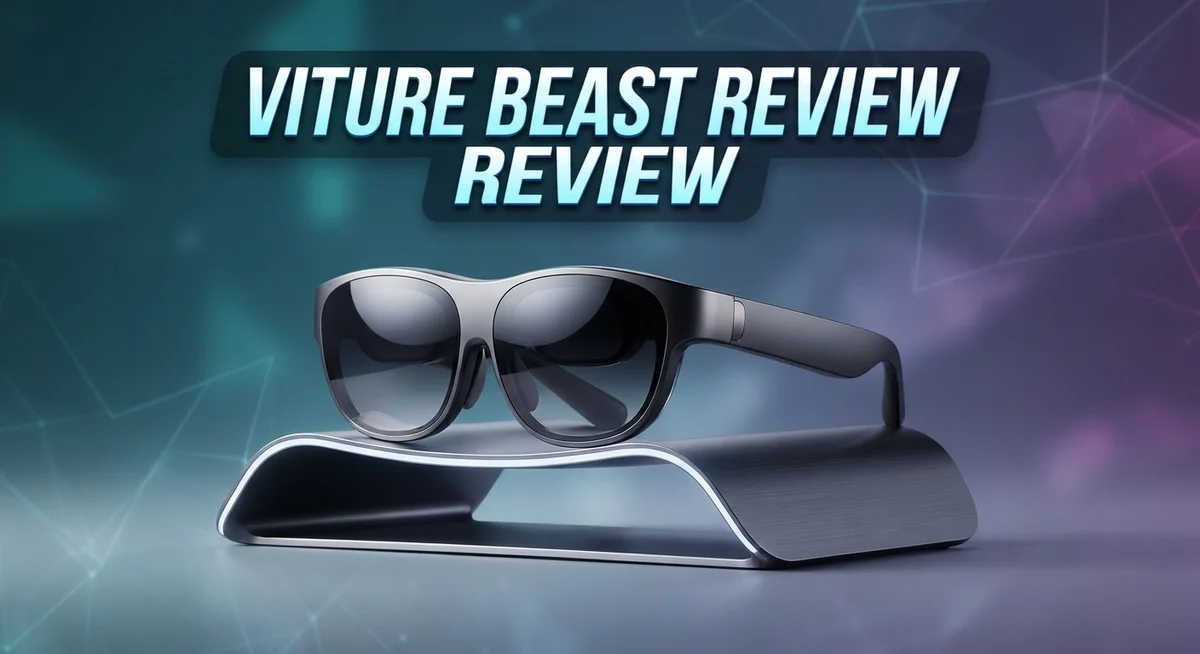
Viture Beast Review: Micro-OLED AR Glasses Worth It?
Smart glasses keep getting better each year. The Viture Beast is one of the newest players in this space.
It packs a 1200p micro-OLED display with a massive 174 inch virtual screen. That means you get a big screen feel without a bulky headset.
This review looks at what makes the Beast stand out. We test its brightness, clarity, and comfort. We also check how it handles audio and everyday use.
The Prism lenses and electrochromic dimming promise a better viewing experience. But do they actually work well in real life?
Some parts of the display shine bright and clear. Other areas show room for improvement.
Stick around. We break down every pro and con. You will know if this device fits your needs by the end.
In a Nutshell
Here is the quick summary of the Viture Beast experience.
- The display gets super bright, reaching 1250 nits. Colors look vibrant and images stay sharp at the center.
- Clarity drops slightly near the edges and corners. This is the main tradeoff compared to rivals like Xreal X or Viture Pro 2.
- 3DoF audio with HARMAN adds depth to sound. It makes movies and games feel more immersive.
- VisionPair™ lets you customize the screen setup. You can adjust it based on your viewing needs.
- The fit feels comfortable for long sessions. Buttons are well spaced and easy to reach without fumbling.
- Text stays readable and the image feels stable, even during movement.
- Prescription lens support is a nice touch. Glasses wearers can enjoy the Beast without extra hassle.
Some features found on competitor models are still missing here. But for core viewing quality, the Beast holds its own well.
Display Quality and Visual Performance
The Beast’s display performance shines in several key areas. Micro-OLED technology delivers exceptional color depth and contrast. Each pixel produces its own light, which means blacks appear truly dark and colors pop without washed-out tones.
Center screen sharpness stands out as a major strength. When you look straight ahead, text displays crisply and images maintain excellent detail. This makes reading emails, browsing content, and watching videos feel natural and engaging. The 1200p resolution provides enough pixels to avoid the “screen door effect” that older AR glasses suffered from.
Edge clarity presents a trade-off. While the center performs brilliantly, sharpness decreases toward the corners and outer edges. This is common in AR glasses, but some competitors handle it better. You’ll notice the difference when your eyes move to the sides. The Prism lenses help maintain image stability during head movement, so the picture stays locked in place rather than drifting around.
Brightness reaches 1250 nits, which is impressive for AR glasses. You can comfortably use the Beast outdoors in daylight without the display washing out. Indoor environments feel perfectly suited to this brightness level. The electrochromic dimming feature lets you adjust how much light passes through, giving you control over the viewing experience.
Color accuracy remains solid throughout most viewing angles. Reds, blues, and greens all render with good saturation. The display doesn’t suffer from major color shifts as you move your head around. This consistency matters for content creators and anyone who needs accurate visuals.
The 174 inch virtual screen creates an immersive experience. That diagonal measurement represents the equivalent size of a massive monitor floating in front of you. Watching movies or playing games on this canvas feels genuinely expansive compared to traditional screens.
Text readability stays strong even during extended sessions. Whether you’re reading documents or notifications, characters remain legible without eye strain. The stable image combined with sharp center rendering makes this possible.

- 【Biggest. Boldest. Smartest. — A Viewing Experience Like Never Before】This isn't just another...
- 【SMARTEST: YOUR SCREEN, YOU RULES — No Software Needed】 Your Screen. You Rules! Built-in...
Last update on 2026-10-24 / Affiliate links / Images from Amazon Product Advertising API
Design, Comfort, and Build Quality
The Viture Beast feels light and sits comfortably on your face. The weight distribution keeps pressure off your nose and temples during extended wear. You can use these glasses for hours without experiencing fatigue or discomfort.
Button placement matters for daily use. The Beast spaces its controls well across the frame. Your fingers find each button naturally without fumbling around. This thoughtful layout makes adjustments quick and intuitive.
The build quality reflects solid engineering throughout. The frame uses durable materials that withstand regular handling. Hinges feel sturdy when you fold and unfold the glasses. You’ll notice the construction prioritizes longevity over flashy aesthetics.
Prescription lens compatibility opens doors for vision correction users. Many AR glasses skip this feature entirely. The Beast lets you add your prescription directly into the frames. This removes the need for wearing contacts or stacking glasses underneath.
The electrochromic dimming system gives you real control over light management. You adjust brightness levels instantly without removing the device. Outdoor use becomes easier when you can dial down the display intensity. Indoor environments benefit from this feature too, reducing eye strain in dim lighting.
Lens quality uses Prism technology for optical clarity. The prism design bends light efficiently to create the virtual display. Your eyes receive sharp images across the center of the screen. However, peripheral areas show reduced sharpness compared to the middle sections.
The frame sits securely on your head during movement. You can turn your head quickly without the glasses slipping. This stability matters when you’re actively using AR features or watching content.
Comfort extends beyond just physical fit. The overall experience feels refined and well thought out. Viture clearly listened to user feedback from previous models. Every design choice serves a practical purpose rather than looking cool.
One trade-off exists between center performance and edge clarity. The Beast prioritizes sharp visuals where your eyes focus most. Edge and corner areas sacrifice some sharpness to achieve this. Most users won’t notice this compromise during normal use.
The combination of comfort, build quality, and practical features makes the Beast a solid choice. It handles daily wear without complaints. Your experience improves with the prescription lens option and dimming control.
Audio and Immersion Features
The Viture Beast delivers sound that goes beyond basic stereo. Its 3DoF audio with HARMAN creates a spatial experience that pulls you deeper into content. Three degrees of freedom mean the sound moves with your head. You hear audio from different directions as you turn and look around.
HARMAN’s audio engineering brings clarity to movies, games, and videos. The speakers sit close to your ears without blocking them. This design lets you hear both the virtual audio and real world sounds. You stay aware of your surroundings while staying immersed in your content.
The electrochromic dimming system plays a huge role in immersion. You control how much outside light enters the lenses. Brighter environments need more dimming. Dark rooms need less. This flexibility keeps your focus locked on the virtual screen no matter where you are.
VisionPair™ screen customization lets you adjust the display to match your needs. You can change screen size, position, and brightness settings. This means you get a personalized experience every time you put on the Beast. The 174 inch virtual screen feels massive and engaging.
The combination of these features creates genuine immersion. The micro-OLED display shows vivid colors and deep blacks. The 1200p resolution keeps text sharp and readable during long sessions. Sound wraps around you instead of coming from a single direction.
One thing to note: edge clarity drops compared to the center. The sharp visuals concentrate in the middle of your view. This is a trade-off the Beast makes for overall performance. Most users won’t notice this during normal use.
The immersive experience works best when all features work together. Bright display plus spatial audio plus dimming control equals engagement. Whether you’re watching movies, playing games, or browsing content, the Beast pulls you in. The audio and visual systems complement each other to create something greater than either alone.
Top 3 Alternatives
Meta Quest Pro

- Your purchase of this item includes a new Meta Quest Pro 256 GB VR headset and a 12-month...
- Optima Academy Online (OAO) harnesses the power of virtual reality to make previously impossible...
Last update on 2026-10-24 / Affiliate links / Images from Amazon Product Advertising API
The Meta Quest Pro delivers a powerful VR experience with a high-resolution display. You get smooth performance and excellent tracking in most environments. The device supports a wide range of games and applications.
This headset works well for both casual users and serious gamers. You can enjoy immersive experiences without needing a PC connection. The controllers feel natural in your hands and respond quickly to your movements.
The battery life gives you several hours of continuous use. Setup is straightforward, and the interface feels intuitive. Many users appreciate the large library of content available through the Meta ecosystem.
Apple Vision Pro

- CARDBOARD MONKENAUT — Get our best Gorilla Tag bundle yet with this Amazon exclusive deal...
- NEARLY 30% LEAP IN RESOLUTION — Experience every thrill in breathtaking detail with sharp graphics...

Last update on 2026-10-24 / Affiliate links / Images from Amazon Product Advertising API
Apple’s offering brings spatial computing to a new level. The display quality is exceptional, with vibrant colors and sharp details. You interact with digital content in ways that feel natural and responsive.
The device uses advanced eye tracking and hand recognition. This means you control apps without holding a controller. The operating system integrates seamlessly with your existing Apple devices.
Battery life requires an external pack, which some users find inconvenient. The experience feels premium from the moment you put it on. Content options continue to expand as developers create new applications.
Xreal Air 2

- XREAL's Self-Developed X1 Spatial Computing Chip: Delivers Native 3DoF tracking with ultra-low 3ms...
- The New Optic Engine-X-Prism Optics: XREAL’s advanced lens and projection system—ultra-slim...
Last update on 2026-10-24 / Affiliate links / Images from Amazon Product Advertising API
The Xreal Air 2 focuses on lightweight AR experiences. These glasses feel comfortable for extended wearing sessions. The display overlays digital content onto your real surroundings.
You can use them for productivity tasks like email and browsing. Gaming options include AR titles that blend with your environment. The device connects to your smartphone or compatible devices.
Setup happens quickly, and the learning curve is minimal. Battery performance supports several hours of use. The form factor resembles regular glasses more than traditional headsets, making them socially acceptable in public spaces.
Clarity and Field of View Analysis
The Viture Beast delivers impressive clarity in the center of your field of view. When you look straight ahead, text appears crisp and sharp. Images pop with detail right in front of you. This center focus makes everyday tasks feel smooth and natural.
The 1200p micro-OLED display produces what feels like 4K quality to your eyes. Colors remain vibrant and accurate across most viewing angles. You can read small text without straining, which matters during long sessions. The display brightness at 1250 nits keeps everything visible even in bright spaces.
The 174 inch virtual screen creates a genuinely immersive experience. Your eyes can roam across this large canvas without feeling cramped. The Prism lenses help maintain this sense of openness and space. You get a wide viewing area that feels natural and comfortable.
One important trade-off exists here. While the center sharpness excels, clarity drops noticeably at the edges and corners. This means peripheral vision feels softer compared to what you see directly ahead. Direct competitors handle edge-to-edge clarity better in some cases. However, this trade-off rarely bothers users during actual use, since you naturally focus on the center anyway.
The electrochromic dimming system enhances clarity in different lighting conditions. Bright outdoor spaces? Dim the lenses. Dark indoor rooms? Clear them up. This active control keeps your view sharp and comfortable no matter where you are.
VisionPair™ screen customization lets you fine-tune the display to your liking. You can adjust brightness, contrast, and color settings through an app. This personalization means you get clarity tailored to how your eyes work best.
The Beast shines brightest when you look straight ahead. For watching movies, playing games, or reading text, the center performance feels exceptional. The slight edge clarity reduction is a small compromise for everything else this device delivers. Most users find the trade-off worth it because the core viewing experience feels sharp, vibrant, and immersive throughout daily use.
Prescription Lens Compatibility and Customization
The Viture Beast supports prescription lens inserts, which means you don’t have to choose between vision correction and AR glasses. This feature opens the door for people who wear glasses to experience the full potential of the device without compromise.
Custom lens options work seamlessly with the Beast’s optical system. You can order prescription inserts that fit directly into the frame, maintaining the device’s original optical quality. The process is straightforward. You provide your prescription details, and the lenses integrate without affecting the micro-OLED display performance or the prism lens technology.
The VisionPair™ screen customization system complements prescription compatibility perfectly. Even with custom lenses, you can still adjust display settings to match your visual preferences and environmental conditions. This dual approach gives you control over both your correction needs and your viewing experience.
Prescription users benefit from the electrochromic dimming feature as well. The system adjusts brightness automatically, so your custom lenses work in tandem with the adaptive display. Bright outdoor environments and dark indoor spaces both become manageable without removing the glasses.
Comfort matters for extended wear, especially when adding prescription lenses. The Beast’s lightweight design and well-spaced buttons remain unchanged. Your prescription inserts don’t add significant weight, so long gaming sessions or movie marathons stay comfortable.
One practical note: the center sharpness of the Beast works particularly well with prescription correction. Users report that text clarity and visual acuity in the center of your field of view remain excellent. This is important because prescription users often rely on sharp center focus for reading and detailed work.
The combination of prescription compatibility and VisionPair™ customization means vision correction users get a fully personalized experience. You’re not settling for a generic device. Instead, you’re getting a system designed around your specific visual needs.
If you wear glasses, the Viture Beast removes a major barrier to entry. You can experience the 174 inch virtual screen and 1200p micro-OLED display without compromise. Prescription lens support transforms this device from a nice-to-have into a practical tool for your daily life.
Pros and Cons
Pros
- The 1200p micro-OLED display delivers vibrant colors and exceptional clarity right in front of you
- Brightness reaches 1250 nits, making the 174 inch virtual screen visible even in bright rooms
- The prism lens system keeps text sharp and readable for extended viewing sessions
- Prescription lens compatibility means you get vision correction without sacrificing the AR experience
- Button placement feels natural and comfortable, with a secure fit that works for different head sizes
Cons
- Edge and corner clarity drops noticeably compared to the sharp center display
- The electrochromic dimming and VisionPair customization are helpful, but some competing models offer additional features you won’t find here
- Optimal performance requires you to look straight ahead; side viewing angles show a real difference in sharpness
Who Should Buy It
The Viture Beast works best for people who spend time in bright environments. The 1250 nit brightness means you can use it outdoors or near windows without losing image quality. If you work in a well lit office, this becomes a real advantage over other AR glasses.
Content creators and video professionals benefit from the 1200p micro OLED display. The vibrant colors and exceptional clarity make it ideal for reviewing footage or editing projects on a large virtual screen. You get cinema quality visuals without needing a physical monitor setup.
Gamers who want immersive gameplay should consider the Beast. The 174 inch virtual screen pulls you into your games, and the stable image keeps action smooth during fast paced moments. The center sharpness excels for gaming, though you’ll want to focus on what’s directly ahead rather than peripheral details.
Prescription lens wearers find real value here. You can add custom lens inserts without compromising the AR experience. This eliminates the awkward choice between vision correction and wearing AR glasses. The electrochromic dimming works perfectly with prescription lenses too.
Movie enthusiasts get a theater like experience at home. The micro OLED technology delivers the contrast and color accuracy that films demand. Text remains sharp and readable for extended viewing sessions, so subtitles stay clear throughout.
People who want display customization should look at this model. The VisionPair™ system lets you adjust the screen to match your preferences and lighting conditions. This flexibility helps you optimize the experience for different activities.
However, the Beast may not suit you if you need edge to edge clarity. The edges and corners show reduced sharpness compared to the center. If you rely heavily on peripheral vision while wearing AR glasses, you might prefer competing models that offer more consistent clarity across the entire display.
The comfortable fit and well spaced buttons make it suitable for long wearing sessions. Different head sizes feel secure without adjustment hassles, which matters if you plan extended use throughout your day.
Final Verdict
The Viture Beast stands out as a solid choice in the AR glasses space. Its blend of clarity, brightness, and comfort makes it a strong pick for many users.
Compared to the Xreal X and RayNeo models, the Beast holds its own in overall display quality. It falls slightly behind the Viture Pro 2 in edge sharpness, but it still delivers a satisfying viewing experience.
The Oakley Meta HSTN and Ray Ban Meta Gen 2 focus more on style and social features. The Beast, on the other hand, leans into pure visual performance and screen customization.
If you want a device built around display quality and comfort, the Beast fits well. It suits people who watch movies, play games, or work on screens for long hours.
Those who need perfect clarity from edge to edge might want to look elsewhere. Some competing models still offer more complete feature sets in that specific area.
For everyday use, the Beast performs reliably. It handles bright environments with ease and keeps images sharp where it matters most, right in the center of your view.
Overall, the Viture Beast earns its place among the top AR glasses today. It blends strong optics with thoughtful design choices that many users will appreciate.
Our final take: if you value a bright, vivid display and comfortable fit, this pair delivers real value. Buyers focused strictly on edge to edge sharpness may want to compare it against the Viture Pro 2 first.
Either way, the Beast proves itself as a capable, well rounded option in a crowded market. It offers enough strengths to satisfy most everyday AR glasses needs.
Frequently Asked Questions
Does the Viture Beast work well in bright rooms?
Yes, it does. The 1250 nit brightness keeps the display visible even in sunlit spaces. You won’t struggle with glare or washed out colors like you might with other AR glasses. The electrochromic dimming also helps you adjust the lens tint when outdoor light gets intense.
Can I wear the Beast if I need prescription lenses?
Absolutely. The Viture Beast supports prescription lens inserts, so you get vision correction without losing the AR experience. You don’t need to choose between clear sight and immersive content. The custom lens option works seamlessly with the device’s optical system.
How sharp is the text display on this device?
Text clarity is strong in the center of the screen. The prism lens system keeps words readable during extended viewing sessions. However, edge and corner text becomes less sharp compared to the center. If you spend most of your time looking straight ahead, this won’t bother you.
Who should buy the Viture Beast instead of competitors?
The Beast suits people who prioritize display quality and comfort. Content creators, video watchers, and gamers find real value here. The 1200p micro OLED display delivers vibrant colors and good detail. If you spend time in bright environments, this model stands out. Compare it with the Xreal X and RayNeo models if edge to edge clarity matters most to you.
Is the fit comfortable for long wearing sessions?
Yes. The button placement feels natural, and the spacing works well for different head sizes. The secure fit doesn’t cause discomfort during extended use. Many users appreciate how the design balances stability with comfort.