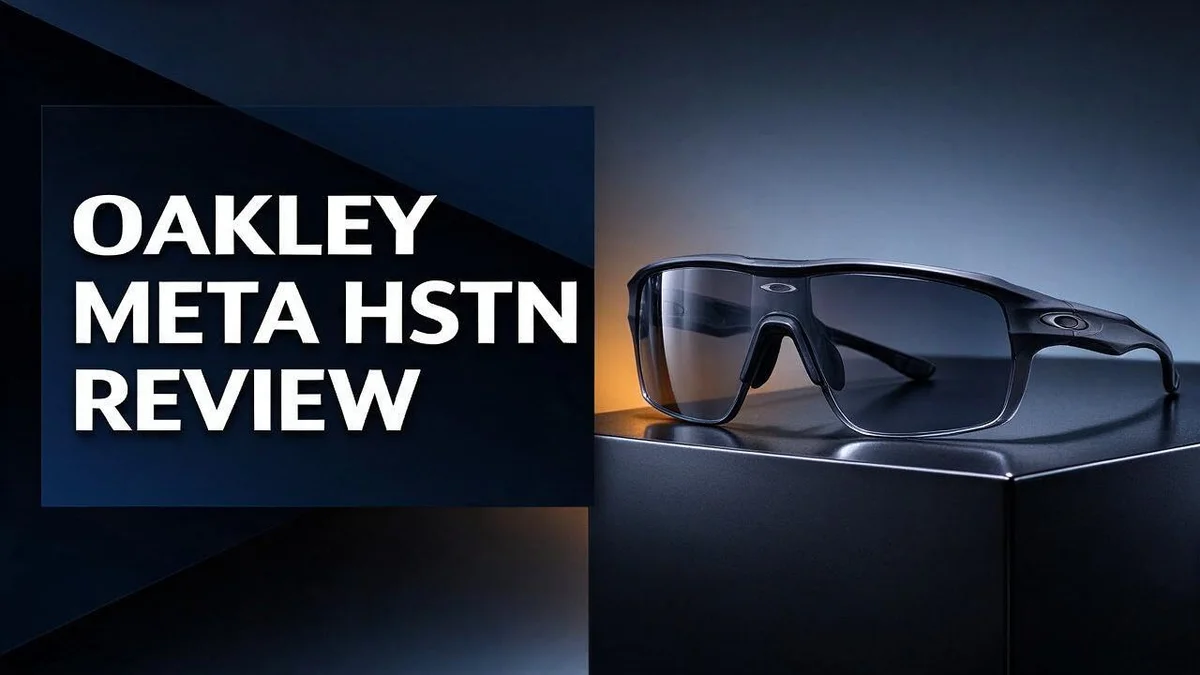
Oakley Meta HSTN Review: Smart Glasses Tested for Camera, Audio and Battery Life
Smart glasses finally look like something you want to wear. The Oakley Meta HSTN proves it with a sporty wraparound style.
These glasses place a centered 12MP ultra wide camera in the frame. They record 3K video and play sound through open ear speakers.
Battery life lasts about eight hours, which beats the earlier Meta glasses. The AI assistant answers quick questions, and sound leakage stays low.
Photos still struggle in low light. Framing a shot also takes practice.
So, do these glasses deserve a spot on your face? This review covers the camera, audio, battery, and style to help you decide.
In a Nutshell
-
Video is a real highlight. The glasses record in 3K, which is a clear step up from the older 1080p. Clips look sharper, and fine details show up better when you share them online.
-
Audio sounds great. Open ear speakers sit inside the frames. Voices and music stay clear, and very little sound leaks out to people sitting near you.
-
The AI assistant is useful. You can ask questions, get quick answers, and control features hands free. It makes daily tasks feel easier, especially when your hands are busy.
-
The style feels sporty. The wraparound shape suits runs, bike rides, and weekend trips. It looks bolder than the classic Ray Ban Meta frames.
-
Framing shots takes practice. You cannot see exactly what the camera captures. Some photos miss the mark until you learn how to aim.
-
Best for active users. Pick these if you love sport style and sharp video. Compare them with the Ray Ban Meta Wayfarer, Ray Ban Meta Gen 2, and Oakley Meta Vanguard before you decide.
Design and Sporty Wraparound Style
Think about how the frames feel on your face. The wraparound shape curves around your temples. That curve keeps the glasses close to your head.
Comfort matters most when you wear them for hours. Heavy frames can cause pressure and headaches. A balanced fit helps you forget you wear tech at all.
The design also works well in daily life. You can wear them on a morning jog. Later, you can wear them to a casual lunch.
Oakley has a long history with sport eyewear. That background shows in the sharp lines and sturdy look. The frames feel built for movement, not just display.
The glasses suit many face shapes, but fit still varies. Try them on in person before you decide. Check how the temples sit behind your ears.
Color choices let you match your mood. Bold shades stand out at the gym or on a trail. Neutral tones blend into office clothes and travel outfits.
Wearing smart glasses in public can feel strange at first. Many people worry about looking like they record everything.
The clean frame design helps them look like regular eyewear. Most onlookers notice the style before the tech.
Sport lovers often want gear that stays out of the way. These glasses aim to keep your focus on the activity. Your camera and audio work quietly while you move.
Final thoughts on design come down to personal taste. Some people want bold sport lines. Others prefer a subtle look. This design leans to the bold side while staying wearable every day.
The overall look balances sport and daily style. It works for training, travel, and weekend errands.

- DESIGNED TO GIVE YOU AN EDGE ON AND OFF THE FIELD — Wearable technology that allows you to capture...
- UP TO 8 HOURS OF BATTERY LIFE — A fully charged pair of Oakley Meta HSTN glasses can last up to...

Last update on 2026-10-31 / Affiliate links / Images from Amazon Product Advertising API
Camera and 3K Video Quality
Video is where these glasses shine most. Sharp footage helps you capture trail runs, group rides, and quick moments with friends. Each clip feels like it came from your own point of view.
Daylight brings out the best results. Bright sun gives the camera plenty of light, so colors look vivid and details stay crisp. Plan your recordings for midday or open shade when you can.
Low light is where the limits show up. Since photos already struggle in dim settings, expect similar limits in evening scenes. Move closer to a light source when you can.
Lighting matters as much as location. Keep the sun behind you when you film a scene ahead. This keeps colors natural and prevents harsh glare.
Movement adds drama to clips. Walk, cycle, or turn slowly to show the scene around you. Smooth motion keeps viewers interested, while sudden jerks can make them dizzy.
Think about your story before you press record. Short clips work well for social posts because they hold attention. Longer clips suit hikes or travel days when you want the full experience.
Pair your footage with a voice note or music later. Clear sound makes your edits feel more polished and fun to share.
Storage needs planning too. Clips take space, so clear your phone before a big day out. Review files each evening so you never miss a moment worth keeping.
A simple routine helps most. Choose one or two favorite shooting spots, test the angle, and check the result. Practice a few clips before a big event so you feel confident on the day. Small steps build better habits over time, and your videos will improve quickly.
Open-Ear Audio and Sound Leakage
Sound leakage is a common worry with open ear designs. Many people wonder if others can hear their music on a busy trail. These glasses keep sound fairly private at normal volume.
The research points to minimal sound leakage, which is a big plus. You can listen during a run without blasting your playlist for the whole street. Lower volume usually keeps the sound close to your ears.
Clear audio matters just as much as privacy. Calls can sound natural, so the person on the other end hears you well. Wind and traffic can still reduce clarity, so test them outdoors first.
Try a quick sound check at home. Play a song at a few volume levels. Then ask a friend to stand nearby and report what they hear.
Volume habits make a big difference. Keep the level moderate in quiet offices or shared spaces. Turn it up only when you need it on a noisy road.
Crowded places need extra care. A train or gym can make people hear more than you expect. Lower the volume when strangers sit close by, and you keep things polite.
Think about safety too. Staying aware of cars, cyclists, and footsteps is key. Use a softer volume when you ride near traffic so you still hear the world around you.
Open ear audio works best when you match it to your routine. Music at the gym, podcasts on a walk, and calls at a park all feel different. Choose your settings based on where you go most.
Remember that sound is only one part of the experience. Pair it with good habits for the best result.
Top 3 Alternatives
Looking for a different pair of smart glasses? These three options are strong choices, and each one offers something a little different.
Ray-Ban Meta Glasses

- #1 SELLING AI GLASSES* – Tap into iconic style and advanced technology with Ray-Ban Meta, the...
- META AI – Get more done and stay connected without reaching for your phone with AI glasses powered...
Last update on 2026-10-31 / Affiliate links / Images from Amazon Product Advertising API
The Ray-Ban Meta Glasses pair a classic frame style with a built-in camera.
You can take photos and record short videos. Simple voice commands or a button press do the work.
They also play audio through small open speakers. They work well for people who want everyday style first.
Even Realities G1

- XREAL's Self-Developed X1 Spatial Computing Chip: Delivers Native 3DoF tracking with ultra-low 3ms...
- The New Optic Engine-X-Prism Optics: XREAL’s advanced lens and projection system—ultra-slim...
Last update on 2026-10-31 / Affiliate links / Images from Amazon Product Advertising API
The Even Realities G1 looks like regular eyeglasses.
Its main feature is a small display. It shows notes, messages, and directions right in your view.
It focuses on reading information, not recording video. This makes it a good pick for a quiet, discreet work tool.
Amazon Echo Frames

- Customize or personalize your Echo Show 21 (2024 Release) with a plastic frame.
- Plastic frame snaps onto Echo Show 21 (2024 Release) for easy installation, no tools required.
Last update on 2026-10-31 / Affiliate links / Images from Amazon Product Advertising API
Amazon Echo Frames bring Alexa to your face.
You can ask questions, set reminders, and control smart home devices. Replies come through discreet speakers.
They do not include a camera or display. They suit anyone who already uses Alexa daily.
Each option serves a different need. Pick the one that matches how you plan to use your glasses every day.
Battery Life and Daily Use
Battery life shapes how you use these glasses every day. Research points to roughly 8 hours of use on a single charge. That covers most workdays, errands, and weekend outings without a midday top up.
Heavy use drains the battery faster. Streaming music, taking calls, and asking the AI assistant for help all draw power. Recording video uses even more, so plan extra time for those clips.
Your daily routine decides how far the charge goes. A short commute with a few calls will feel easy. A full day of music, directions, and photo bursts may need a recharge before evening.
Try a simple charging habit. Charge the glasses while you get ready in the morning or during lunch. A quick top up keeps them ready for an unexpected plan. Keep the charging case with you when you travel so you never run out far from home.
Think about where you spend most of your time. Office days, school runs, and shopping trips each place different demands on the battery. Track your usage for a few days to spot your personal pattern.
Cold weather can also shorten battery life on winter hikes or early morning runs. Keep the glasses close to your body to stay warm. Carry a small power bank for long adventures far from an outlet.
Battery performance can change over time. Like most wearable tech, the battery may hold less charge after months of daily use. Keeping the glasses out of hot cars and direct heat helps protect the battery and extends its life.
Battery life works best when you match it to your routine. Use the glasses in shorter bursts during busy days. Save longer sessions for weekends or days when you can recharge easily.
AI Assistant and Smart Features
The AI assistant is one of the best parts of these glasses. You talk to the glasses and hear answers through the open ear speakers. Your phone can stay in your pocket for quick questions.
Voice commands keep your hands free. Ask about the weather, set a reminder, or check a simple fact. The assistant responds in a few seconds. This helps most when you ride, hike, or carry bags.
Real life use gives the feature a purpose. Ask for a landmark name while you explore a new city. Ask what time your next class starts. Short, clear questions work best for most people.
Speak clearly and keep phrases short. Background noise on a busy street can confuse the mic. Practice a few commands at home first. Many users find this habit fun after a few days.
The glasses pair with your phone over Bluetooth. This link lets the assistant work smoothly with the apps you already use. The result feels like one tool rather than two separate devices.
Privacy deserves a moment of thought. People nearby may notice you talking to your glasses. Let friends and coworkers know what the feature does.
Check the privacy controls in the companion app. This step shows you what data gets shared.
The AI assistant adds real value to daily life. It turns the glasses into a helpful companion. It works especially well for people who want quick answers without pulling out a phone. Give it a week of testing and you will know if it fits your routine.
Framing Shots and Low-Light Photo Performance
Framing shots takes some practice with these glasses. The camera sits centered on the front. That placement feels natural, but you still need to aim with care.
The ultra wide lens pulls in a lot of background. Your subject may end up small in the frame. Step closer, or keep the subject near the middle.
You do not get a live screen preview. Try a few test shots first. Check them on your phone before the moment passes.
Tilt your head slightly to fix an awkward angle. Shooting from eye level often works well. Small changes help you get the frame you want.
Think about where your subject stands. Put people off center for a natural look. Simple rules like this make your photos feel more polished.
Low light photos need extra help. The research notes that photos struggle in dim settings. Grain and blur can show up fast.
Light is your best friend here. Face a light source when you can. Stand near a window, under a street lamp, or in a well lit room.
Backlight can ruin a shot. Avoid placing bright lights behind your subject. The camera may darken faces and wash out details.
Keep your hands steady too. Lean on a wall or hold your breath for a second. Small moves make a sharp difference.
For dim scenes, test a short clip first so you know what to expect.
Set your expectations. These glasses shine in daylight and everyday moments. Night shots work best when you keep the scene simple and bright.
Good framing and smart lighting make a big difference. With a little practice, you can capture fun moments and keep them clear.
Pros and Cons
Pros
- Sharper 3K video for your everyday clips
- Sporty wraparound frames suit active days
- Open ear speakers keep sound close to you
- Sound leakage stays low for nearby people
- Clear audio for music and phone calls
Cons
- The sporty look may not match every outfit
- The centered camera can feel odd at first
- Setup takes a few steps in the companion app
Who Should Buy It
These glasses fit people who stay on the move. Someone who commutes, cycles, or travels often can wear them through a full day. They turn ordinary outings into chances to record moments.
Commuters can use them between meetings or while running errands. The open ear design lets you hear the street around you. Office workers can also use them during lunch breaks when they want to share a quick view with a friend.
Casual content creators may also enjoy them. Short clips of a meal, a walk, or a funny moment feel natural from this angle. You can focus on the scene instead of holding up a phone.
Parents and grandparents often want to capture kids without staying glued to a screen. These glasses let you stay present while you record. Think about the moments you most want to remember without a device in the way.
Some buyers should look elsewhere. People who shoot many dim indoor photos may feel let down. Those who want a classic look for formal events may prefer a more traditional frame.
Anyone who rarely uses voice tools or smart features may not get much from them. Some people prefer to keep their tech simple and quiet. Ask yourself if you will use these features every week. If the answer is no, a simpler pair might suit you better.
Overall, the right buyer enjoys hands free living. If you like an active life and want easy recording on the go, this pair deserves a close look. Try a few shots in your own space before you commit to daily use.
Final Verdict
The Oakley Meta HSTN is a smart pick for people who live on the move. It records sharp video, plays clear audio, and lasts longer than Ray-Ban Meta.
It earns a strong recommendation for active buyers. The strengths clearly outweigh the flaws.
Think about how you will wear them most days. Daily use matters more than spec sheets. If you want a camera and speakers you can forget about, these glasses deliver.
The battery gives you room to breathe. Roughly eight hours means you can leave the charger at home for a full day out.
Now weigh the trade offs. Dim photos and tricky framing are real limits. Most buyers will accept them if video and audio come first.
Here is how the alternatives compare.
Ray-Ban Meta in Wayfarer or Gen 2 styles suits people who prefer a classic look. It also costs you some battery life.
The Oakley Meta Vanguard gives you another Oakley option if you want to compare styles. Check it before you decide.
Xiaomi, Solos, Nautica, Halliday, and Even offer other smart glasses. Each one takes a different approach to features and looks.
Try them on if you can. A good fit changes how often you will actually wear them.
My final call: buy the Oakley Meta HSTN if you value video quality, comfortable audio, and a sporty style. Skip it if you want a polished night photo machine.
These glasses do a few things very well. That focus makes them easy to like and easy to recommend.
Rating: a confident yes for the right wearer.
Frequently Asked Questions
Are these a good first pair of smart glasses?
Yes, they can be. Simple recording and easy audio make them a friendly starting point. Give yourself a few days to learn the basic commands before you rely on them.
Will people nearby notice when I record?
Most smart glasses show a small light while they record. Be open about filming in private spaces, and ask before you record people up close. This keeps your day polite and comfortable for everyone around you.
How do I keep the lenses clean for better shots?
Smudges can soften your photos, especially in bright sun. Wipe the lenses with a soft microfiber cloth each morning. Skip paper towels, because they can leave tiny scratches on the glass.
What should I check before I buy?
Look at how the frame sits on your nose and ears. Think about where you will wear them most days. A comfortable fit matters more than any single feature. Wear them for a few minutes and move your head around to test the balance.
Do I need practice before using them on a trip?
Yes, a little practice helps. Spend an afternoon at home recording short clips and checking the framing. You will feel more confident when you travel and want to capture the moment quickly.