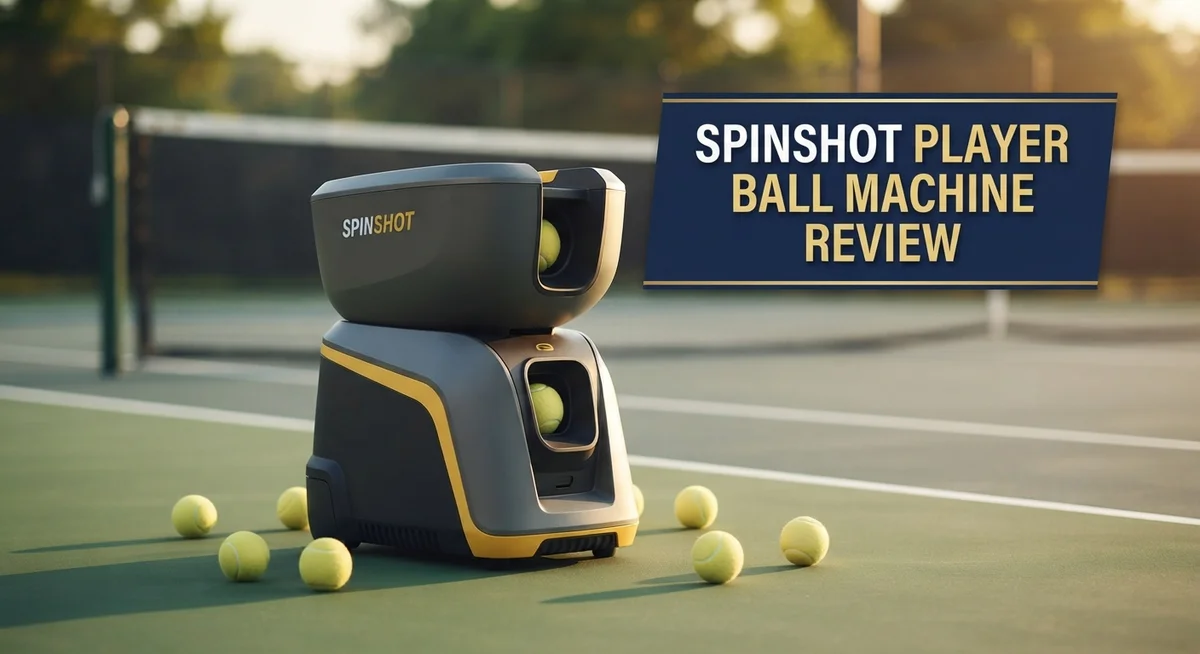
Spinshot Player Ball Machine Review: Should You Try This?
Want a practice partner that never gets tired? The Spinshot Player ball machine might be your answer.
This machine promises a lot. It offers a wide speed range, smart drills, and a portable design.
But does it really deliver on the court? We put it to the test.
In this review, we break down every feature. We look at battery life, programmable routines, and build quality.
We also check the not so great parts. WiFi issues and customer service problems are real concerns for many players.
Is the Spinshot Player worth your time? Stick with us. We compare it to top competitors like the Slinger Bag and Tennis Tutor Lite.
By the end, you will know exactly what this machine offers. You can decide if it fits your training needs.
Let’s serve up the details.
In a Nutshell
Here is the quick rundown of what you need to know about the Spinshot Player:
-
Battery life stands out as a top strength. It runs for hours on a single charge, so you can practice all day without worry.
-
Programmable drills make training fun. You get 12 preset routines, plus the freedom to build your own custom sessions.
-
Portability is a real plus here. The lightweight, compact frame slides into your car trunk without any fuss.
-
Build quality feels solid on court. Nothing shakes or wobbles, even during fast rallies.
-
Real users back this up too. The machine holds a strong 4.6 out of 5 rating from actual buyers.
-
On the flip side, WiFi connection drops happen often. The phone remote can also feel unreliable when you need it most.
-
Some buyers report frustrating experiences with customer support when problems come up.
-
The entry level model skips spin control entirely, which limits your practice variety compared to pricier versions.
Build Quality and Portability
The Spinshot Player excels in portability and build quality, making it a standout choice for players who move between courts. The machine weighs just enough to carry comfortably, yet feels sturdy when you set it up on the court.
The frame uses durable materials that resist wear from regular play. Players report the construction holds up well after months of use. The wheels roll smoothly on most court surfaces, and the overall design feels compact without sacrificing stability during ball delivery.
Battery performance is genuinely impressive here. A single charge lasts through extended practice sessions, so you won’t find yourself hunting for a power outlet mid-training. This makes the Spinshot Player perfect for outdoor courts or facilities without convenient electrical access.
The machine breaks down into manageable pieces. You can fit it in a car trunk or transport van without difficulty. Setup takes just a few minutes, so moving from one location to another won’t eat into your practice time.
Adjustability adds to its practical design. The height, angle, and oscillation settings all move smoothly without complicated tools. The feed rate dial responds quickly to changes, letting you switch between rapid-fire drills and slower, controlled shots.
One thing to note: the entry level model keeps things simple but feels slightly less polished than higher tier versions. The basic plastic components still work well, though they show wear faster with heavy use. If you plan to use this machine several times weekly, investing in the upgraded version pays off in durability.
The oscillation mechanism moves reliably side to side, though some users mention it could be smoother at extreme settings. The height adjustment bracket grips firmly, preventing unwanted shifts during play.
Overall, the Spinshot Player delivers solid construction that matches what serious players expect. It’s not the lightest option available, but the balance between portability and durability makes it practical for most training scenarios. Whether you’re setting up at your home court or traveling to tournaments, this machine travels well and performs consistently.

- Ball Capacity: The foldable ball hopper holds over 120 balls
- Use Phone to Program each Shot for Speed, Spin, Height, Angle and Feed Rate; No additional Cost for...
Last update on 2026-10-24 / Affiliate links / Images from Amazon Product Advertising API
Speed, Spin, and Programmable Drills
The Spinshot Player delivers impressive speed and spin capabilities that adapt to your skill level. The machine launches balls at speeds ranging from 18 to 80 mph, giving you room to grow as your game improves. This range works for beginners learning fundamentals and advanced players seeking challenging rallies.
Spin control is where this machine shows real strength. You can adjust topspin, backspin, and sidespin independently. This means you practice against realistic shot variety instead of flat, boring feeds. The horizontal oscillation feature moves the ball side to side, simulating how opponents hit from different court positions. Height adjustment lets you work on volleys, overheads, and low balls without manual repositioning.
The programmable drills feature sets the Spinshot Player apart from basic machines. You get 12 pre programmed routines that target specific skills like baseline rallies, serve and volley sequences, and crosscourt patterns. Better yet, you can build completely custom drills that match your exact training goals. The feed rate adjusts so balls come faster or slower depending on your drill.
One important note: the entry level model operates at 48 mph and lacks spin control features. If you want variety in spin, you’ll need a higher tier version. This distinction matters because spin control separates casual practice from serious skill development.
The machine’s programmability extends to timing and rhythm work. You can set specific intervals between ball feeds to match match conditions. Some players use this to simulate pressure situations where they must reset quickly between points.
Real users praise how the customizable drills keep practice fresh and engaging. Rather than hitting the same shot repeatedly, you work through structured sequences that build game readiness. The ability to save multiple drill programs means you can run different workouts on different days without reprogramming each time.
Battery operation doesn’t compromise performance here. The machine maintains consistent speed and spin throughout your session. You won’t notice power degradation as the battery drains, which matters when you’re tracking improvement across drills.
Battery Life and Runtime
The Spinshot Player runs on battery power, which means you get genuine portability without being tethered to outlets. This is a major advantage if you practice at different courts or travel frequently.
Real-world battery performance impresses most users. The machine delivers consistent output throughout a full practice session without sudden power drops. You won’t find yourself scrambling to recharge mid-workout on typical days.
Runtime depends on your usage pattern. Heavy spin and maximum speed settings draw more power than basic feeds. If you run the machine continuously at high settings, expect shorter sessions than moderate play. Most players report getting through a solid practice without needing to plug in.
The battery charges relatively quickly compared to older ball machine models. You can recharge overnight and be ready for the next day. This makes it practical for back-to-back training days or weekend tournaments.
Portability and battery operation work together nicely here. You’re not limited by cord length or outlet availability. This freedom lets you set up on any court that suits your needs. The lightweight design means carrying the machine becomes easy, even with the battery included.
One thing to know: battery life does degrade over time like all rechargeable systems. After several years of regular use, you may notice reduced runtime. Replacement batteries are available, though this adds a future consideration to your ownership.
Temperature affects performance slightly. Cold weather can reduce battery efficiency temporarily, though the machine bounces back once it warms up. Hot conditions typically don’t pose problems for the battery system.
The machine’s battery compartment is accessible and straightforward. You won’t need special tools or technical knowledge to swap batteries if needed. This practical design keeps maintenance simple.
For players seeking a machine they can move between locations without hassle, the battery-powered setup delivers real value. The runtime matches what most practice sessions demand. You get freedom from power cords while maintaining reliable performance throughout your training routine.
Top 3 Alternatives
Lobster Elite Grand

- ADJUSTABLE BALL SPEED & SPIN CONTROL: Fine-tune your practice sessions with adjustable ball speeds...
- TRIPLE OSCILLATION, 2-LINE, RANDOM PLAY: Simulate true match play by combining both vertical and...
Last update on 2026-10-24 / Affiliate links / Images from Amazon Product Advertising API
The Lobster Elite Grand offers serious players a machine that delivers consistent shots. This model shoots balls at speeds up to 100 mph, so you get realistic match conditions. The dual-hopper system lets you load two different ball types at once, which saves time during practice sessions.
You can program spin, speed, and direction with ease. The machine handles clay, hard courts, and grass surfaces well. Players appreciate the sturdy build and reliable performance over many seasons of use.
Prince Tennis Tutor

- BALL TOSS - Adjustable from 12 to 20 feet.
- BALL FEED INTERVAL - Throws a ball every five seconds.
Last update on 2026-10-24 / Affiliate links / Images from Amazon Product Advertising API
Prince Tennis Tutor brings affordability without sacrificing quality. This machine shoots balls smoothly across the court at adjustable speeds. It works great for beginners and intermediate players who want to improve their groundstrokes and volleys.
The setup process takes just minutes. You get variable spin options and a simple control panel. Many users like that this model requires less maintenance than heavier machines. The compact design makes storage simple for home courts.
Tourna Ball Machine Pro

- Hundreds of pre-loaded drills & unlimited custom drills.
- App & remote control; sync 30 drills from App to remote. Supports OTA updates.
Last update on 2026-10-24 / Affiliate links / Images from Amazon Product Advertising API
Tourna Ball Machine Pro combines power with smart features. This machine fires balls at competitive speeds and includes programmable patterns for different shot types. Players can practice specific scenarios like serving returns or baseline rallies without a partner.
The hopper holds plenty of balls, so practice sessions last longer. The machine adjusts to different court surfaces easily. Durability stands out as a key strength, with many owners reporting years of reliable use. The control interface responds quickly to your inputs, making adjustments mid-practice simple.
Connectivity and Remote Control Reliability
The Spinshot Player’s connectivity features present a mixed picture that deserves honest attention. WiFi connectivity drops frequently, which frustrates users who rely on wireless control during practice sessions. This isn’t a minor inconvenience—it directly impacts your ability to adjust settings mid-session without walking back to the machine.
The phone remote control shows reliability issues that users consistently report. Connection stability varies depending on your phone model and distance from the machine. Some players experience seamless control while others face repeated disconnections. Testing in your specific environment matters before committing to remote adjustments during active practice.
The good news: battery operation eliminates cord management problems entirely. You can position the machine anywhere on your court without hunting for power outlets. This portability advantage stands out compared to corded competitors. The machine’s wireless features work best when you stay relatively close and perform occasional adjustments rather than constant tweaking.
Real users suggest downloading the latest app version and updating the machine’s firmware to minimize connection drops. These software improvements sometimes resolve connectivity issues that plague older software versions. Restarting the app occasionally helps restore stable connections when drops occur.
For players who prefer simplicity, the manual controls work reliably without any digital connection needed. You can adjust speed, spin, and oscillation using physical buttons on the machine itself. This backup option means connectivity problems won’t completely halt your training session.
The connectivity limitations matter most if you plan frequent remote adjustments from court-side. Casual users who set up drills and let the machine run experience fewer frustrations. Power users who constantly modify settings mid-practice should factor this into their decision.
Bottom line: treat the remote as a convenience feature rather than a core function. The machine delivers solid performance through manual operation. Wireless connectivity works for basic adjustments but isn’t reliable enough for advanced remote control workflows. Understanding this distinction helps set realistic expectations before your first practice session.
Customization and Training Features
The Spinshot Player lets you build training routines that match your specific needs. You can adjust spin, horizontal oscillation, height, and feed rate independently. This flexibility means you create drills for different court positions and shot types.
The machine includes 12 pre-programmed drills right out of the box. These drills cover common training scenarios like baseline rallies, approach shots, and serve returns. You can use them as-is or modify them completely. Real players appreciate how these starting templates save setup time while remaining fully customizable.
Speed control ranges from 18 to 80 mph on the HS model, giving you options from warm-up feeds to competitive pace. The entry-level model maxes out at 48 mph without spin features, so consider your skill level when choosing. Intermediate and advanced players benefit most from the higher-tier versions.
Timing and rhythm work stands out as a unique strength here. You can program the machine to feed balls at specific intervals. This helps you develop consistency in your stroke timing and court movement. Many players use this feature to simulate match pressure situations.
The customization extends to height adjustment as well. You can set feeds at different bounce points on the court. This trains your eye to track the ball through various trajectories and prepares you for real match conditions.
Manual controls work reliably without needing any app or remote connection. If you prefer simplicity over digital features, you can operate everything from the machine itself. The buttons are straightforward and responsive.
For players who want remote adjustments, the phone app exists but shows connection reliability issues. The good news is that most training happens with the machine positioned and programmed before you start hitting. You rarely need to change settings mid-session.
The real value comes from consistency. Once you program a drill, the machine repeats it exactly the same way every time. This repeatability lets you focus purely on improving your stroke mechanics and footwork without worrying about ball placement variation.
Pros and Cons
Pros
- Battery lasts through multiple training sessions without needing a charge between uses
- 12 built-in drills plus full customization lets you create routines for your specific game
- Compact and lightweight design means you can move it from court to court easily
- Solid construction quality holds up well through regular training sessions
- Speed range from 18 to 80 mph covers everything from warm-ups to match pace
Cons
- WiFi connection drops frequently, interrupting remote control functionality
- Phone app remote shows reliability issues that frustrate many users
- Customer service response times disappoint players when problems arise
- Entry level model maxes out at 48 mph and lacks spin control features
Who Should Buy It
The Spinshot Player works best for intermediate players who want portability without sacrificing training variety. If you move between courts regularly, the lightweight design keeps setup quick and hassle-free.
Solo practice sessions benefit most from this machine. You get consistent ball delivery for groundstroke drills, serve returns, and footwork timing. The 12 pre-programmed routines let you focus on technique rather than fetching balls manually.
Players who prefer simplicity over digital features should consider this model. The manual controls work reliably every single time. You don’t need WiFi, apps, or remote connections to run a complete training session. Just set your speed, spin, and height, then hit.
Coaches managing multiple courts find the portability attractive. Moving between locations takes minutes instead of hours. Battery operation means you skip extension cord problems entirely. This matters when you’re juggling equipment across different facilities.
Competitive players preparing for matches gain real value here. The speed range goes from 18 to 80 mph, covering everything from warm-up pace to match intensity. You can program specific shot sequences that mirror patterns you’ll face in competition.
The machine suits players who want customization without overwhelming complexity. You’re not buying a professional touring model with hundreds of settings. Instead, you get enough adjustment options to build meaningful drills for your specific game.
Skip this model if you demand flawless remote control functionality. The WiFi connection drops frequently, and the phone app frustrates users who want court-side adjustments. If you need that feature, look elsewhere.
Players who struggle with technology will appreciate the straightforward approach. Manual buttons handle everything. No app updates, no firmware patches required. You control the machine directly.
Budget conscious players benefit from the entry-level model at 48 mph. This works perfectly for beginners and intermediate players building consistency. The HS version with 80 mph speed suits advanced players chasing competitive pace.
Ultimately, buy this machine if you value portability, basic customization, and reliable manual operation. You get solid training variety without expensive features you won’t use.
Final Verdict
The Spinshot Player earns its strong reputation among ball machine users. A 4.6 out of 5 rating from actual owners speaks to real satisfaction levels.
This machine delivers where it matters most. Training variety and battery performance stand out as genuine strengths.
Build quality remains consistent across different units. Players report the machine holds up well after months of regular use.
The WiFi and app issues do create real frustration. If you rely heavily on remote features, this drawback matters to your daily experience.
Manual operation stays rock solid though. Many players simply skip the app and use direct controls instead.
Compared to alternatives like the Slinger Bag or Tennis Tutor Lite, the Spinshot Player offers more programmable drills. Its portability also beats bulkier machines from Silent Partner and Nisplay.
Each competitor brings different strengths to the table. The Spinshot Player wins on flexibility and training depth rather than pure simplicity.
This machine fits specific player types best. Intermediate to advanced players who train solo will get the most value from its features.
Coaches working across multiple courts benefit from its light frame. Setup and teardown happen fast between sessions.
Players who want a plug and play experience might feel disappointed. The learning curve for programming drills takes some patience upfront.
Overall, the Spinshot Player rewards patience with genuine training benefits. Once you learn the drill programming, your practice sessions become far more productive.
Skip this option only if remote control reliability is a dealbreaker for you. Otherwise, this machine delivers solid performance for serious training needs.
Consider your priorities carefully before deciding. Do you value programmable drills and portability more than seamless app connectivity?
If training variety matters most, the Spinshot Player makes a smart choice. Serious players and coaches will likely find it earns its place in their training routine.
Frequently Asked Questions
Does the Spinshot Player work for beginners?
Yes, but it suits intermediate players better. The entry-level model maxes out at 48 mph and lacks spin control, which works fine for learning basics. The HS model reaches 80 mph with full spin adjustment, making it more flexible as your game improves.
Beginners benefit from the 12 pre-programmed drills. You can start slow and build consistency without overthinking settings.
Can I use this machine outdoors on any court?
Absolutely. The battery-operated design means you don’t need power outlets or cables. Its lightweight frame makes moving between courts simple.
Just keep it away from water and extreme weather. The portable design shines when you train at different locations.
What’s the main issue with the remote control?
WiFi drops happen frequently, which interrupts your session. The phone app also shows reliability problems that frustrate users mid-practice.
Manual operation works perfectly though. You can still run drills by using the machine’s buttons directly. Many players switch to manual mode and skip the app entirely.
How does this compare to the Slinger Bag or Tennis Tutor Lite?
Each machine has different strengths. The Spinshot Player offers more programmable routines and better portability than competitors. The Slinger Bag costs less but has fewer customization options. Tennis Tutor Lite provides advanced features but weighs more.
Your choice depends on what matters most: simplicity, features, or mobility. The Spinshot Player balances all three reasonably well.
Is customer service reliable if something breaks?
Unfortunately, no. Response times disappoint players with problems. Check the warranty details before buying and consider this a potential weakness if you need quick support.